Billing and help
Getting help
Contact the Shoppy Find in Store team, book a free setup session, and what to include so we can help you quickly.
helpsupportcontactsetup sessiononboarding
Go to Help in the app menu to contact us or book a free setup session.
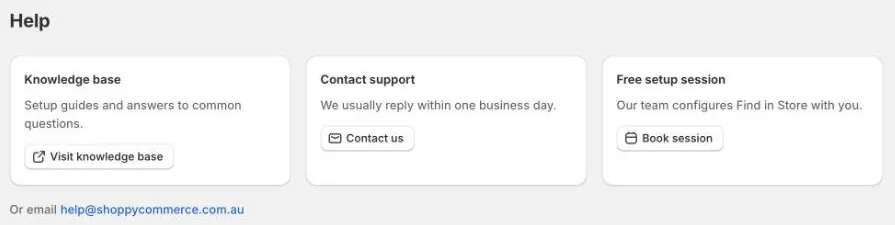
Contact support
- Click Help in the app menu.
- Under Contact support, click Contact us.
- Check Your email. We’ll reply to this address.
- Under How can we help?, describe the problem.
- Click Send. Your email app opens with your message ready. Send it from there.
You can also email us at help@shoppycommerce.com.au. We usually reply within one business day.
What to include
To help us find the problem quickly, tell us:
- The link to a product page where you see the problem.
- What you expected to see, and what you see instead.
- The address or postcode you searched, if it’s about store search.
- The store, if it’s about one location.
- A screenshot, if you can.
Book a free setup session
Every plan includes a free setup session, where our team sets up Find in Store with you.
- Click Help in the app menu.
- Under Free setup session, click Book session.
- Your email app opens with a message ready. Add the days and times that suit you, with your time zone, then send it.
You can also book from Home: click Book a free setup session at the bottom of the page.
Before you contact us
Many questions are answered in these guides: